

Zisson Socialboards 2026 – No. 3
08/09/2026
This release focuses on Inbox interface customization, improved ticket handling, flexible anonymization rules, webhook verification, and miscellaneous bug fixes.
Improvements:
Hide elements on the Inbox interface
Closed tickets are removed from ticket view
Use rules to set anonymization time for tickets
Standard webhooks now support verification token delivery via HTTP header
Miscellaneous bug fixes
Hide elements on the Inbox interface
What’s new
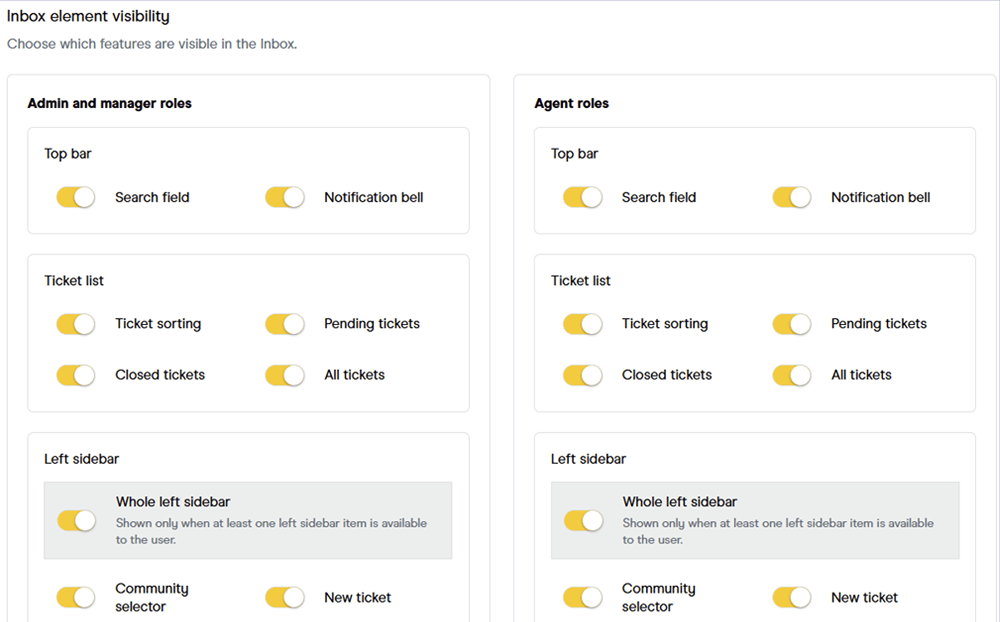
Admins can now choose which elements of the inbox are visible to users.
How it works
Admins configure these settings centrally, they cannot be set by team members. Each role group had its own visibility configuration.
How to use
In the Settings for your community, go to General > Display settings go to Inbox UI element visibility. Click the toggles to show or hide individual elements.
Closed tickets are removed from ticket view
Note: This feature has been postponed to a later release.
What’s new
When a ticket is closed, it is removed both from the ticket list and from the ticket view.
How it works
Currently, when an agent closes a ticket, it is removed from the ticket list but remains in the ticket view. With this update, it will be removed from both.
How to use
Close the ticket.
Use rules to set anonymization time for tickets
What’s new
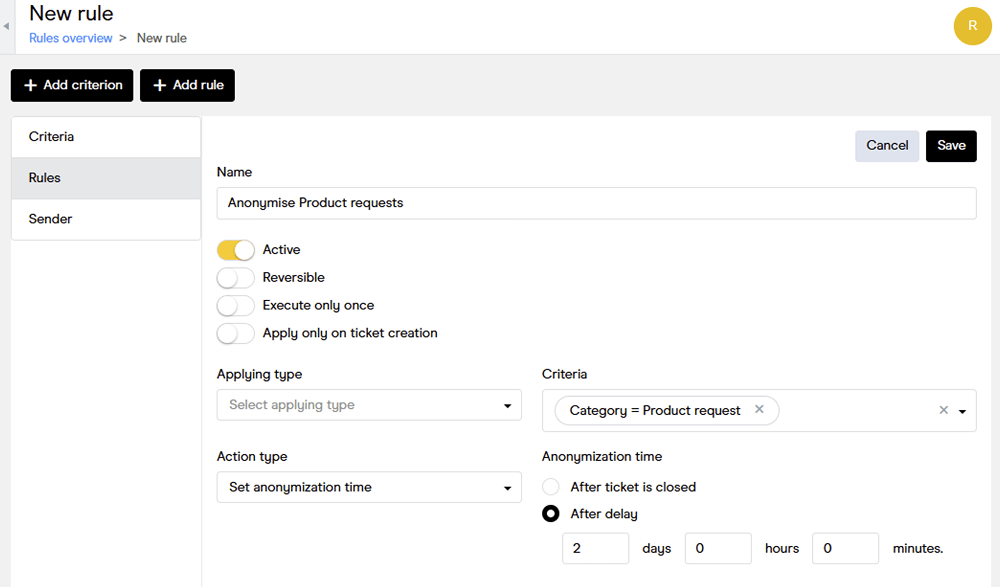
The rules engine now lets you set anonymization time for your tickets based on criteria you select.
How it works
Currently, a global limit for when tickets should be anonymized exists. Now you can define rules which match different criteria, allowing different anonymization delays for different ticket categories, for example.
How to use
1. Select Rules from the left-hand menu.
2. Add a new criterion if needed.
3. Click Add rule.
4. Click the Criteria drop-down list and select the appropriate criterion.
5. Click the Action type drop-down list and select Set anonymization time.
6. Click to select either After ticket is closed or After delay. If you choose the latter option, define how long the delay should be.
Please note: Once a ticket is anonymized, it cannot be undone.
Standard webhooks now support verification token delivery via HTTP header
What’s new
Standard webhooks (Ticket, Reply, Note, and External Chat) now send the verification token in the X-Socialboards-Verify-Token HTTP header in addition to the existing verifyToken URL query parameter.
How it works
The query parameter remains fully supported, so existing integrations are unaffected.
How to use
We recommend migrating to the header, as the query parameter is planned for deprecation in a future release (with advance notice).
Miscellaneous bug fixes
It is now possible to continue a chat on the customer side even if the chat is offline.
Custom links to contact forms now work even when the chat is offline.
Pinning the reply editor no longer overlaps ticket contact in Firefox browser.
Translations in the chat widget are now applied on the welcome page.