
Zisson Release Notes – 2026-01
22/01/2026
Chat flow improvements:
IP-address tracking
Optional limits on customer chat message size
Chat widget – registrations fields
Chat Entry point – Improved configuration UI
Shape:
Blast Call – Emergency conference service
Agent improvements:
Updated Agent UI – Modernized Color Scheme
Goup SMS are now linked an SMS conversation flow
Improved warning and error notifications
Admin improvements:
Identity Services Admin – central identify provider orchestration
New retentions setting for session fields
Integrations & API:
Click2Call via Tel links
Tele2 växel – contact forward info
LeadDesk AI Bot – Agent Assistant Integration
BankID Integration for the Norwegian Market
UX & Smaller improvements:
UX & Smaller improvements
Functional Updates:
Chat flow improvements
IP-address tracking
What is coming
Controlled access to customer IP addresses in chat conversations.
We’ve updated the chat experience to display customer IP addresses with improved UI and stricter access control.
This supports use cases where reliable customer identification is critical, such as security-related incidents or emergency service involvement.
How it works
Role-based access and configurable entry-point capture.
Customer IP addresses are captured at the chat entry point (when enabled) and stored with the conversation.
Visibility is controlled through agent feature settings, allowing admins to define which users are permitted to view customer IP information.
This ensures sensitive data is only accessible to authorized users while remaining available when needed for security or emergency workflows.
How to use
Available for all customers running ZI chat activated via admin configuration on the entry point and via an agent feature.
Optional limits on customer chat message size
What is coming
We’ve introduced the ability to limit the size of chat messages sent by customers.
This helps prevent message overload, improves readability for agents, and gives better control in flows where structured or concise input is required.
How it works
Configurable limits at the chat entry point.
A new optional setting is available on the chat entry point, allowing you to define the maximum allowed message size for customer (inchatter) messages.
When enabled, messages exceeding the limit are restricted, ensuring controlled input without impacting the overall conversation flow.
How to use
Available for all customers running ZI chat activated via setting on entry point.
Chat widget – registrations fields
What is coming
Structured chat registration form with dropdown and list fields.
We’ve extended chat registration fields in the chat widget to support dropdowns and predefined lists.
This enables more consistent data collection, reduces free-text errors, and improves downstream use in reporting, routing, and integrations.
How it works
New field type with session field mapping.
A new registration field type can be configured on the chat entry point, allowing customers to select values from a predefined list.
Selected values are stored as session fields, visualized in the chat panel and conversation history, and made available through the Session Field API for external integrations.
How to use
Available for all customers running ZI chat via setting on the entry point.
Chat Entry point – Improved configuration UI
What is coming
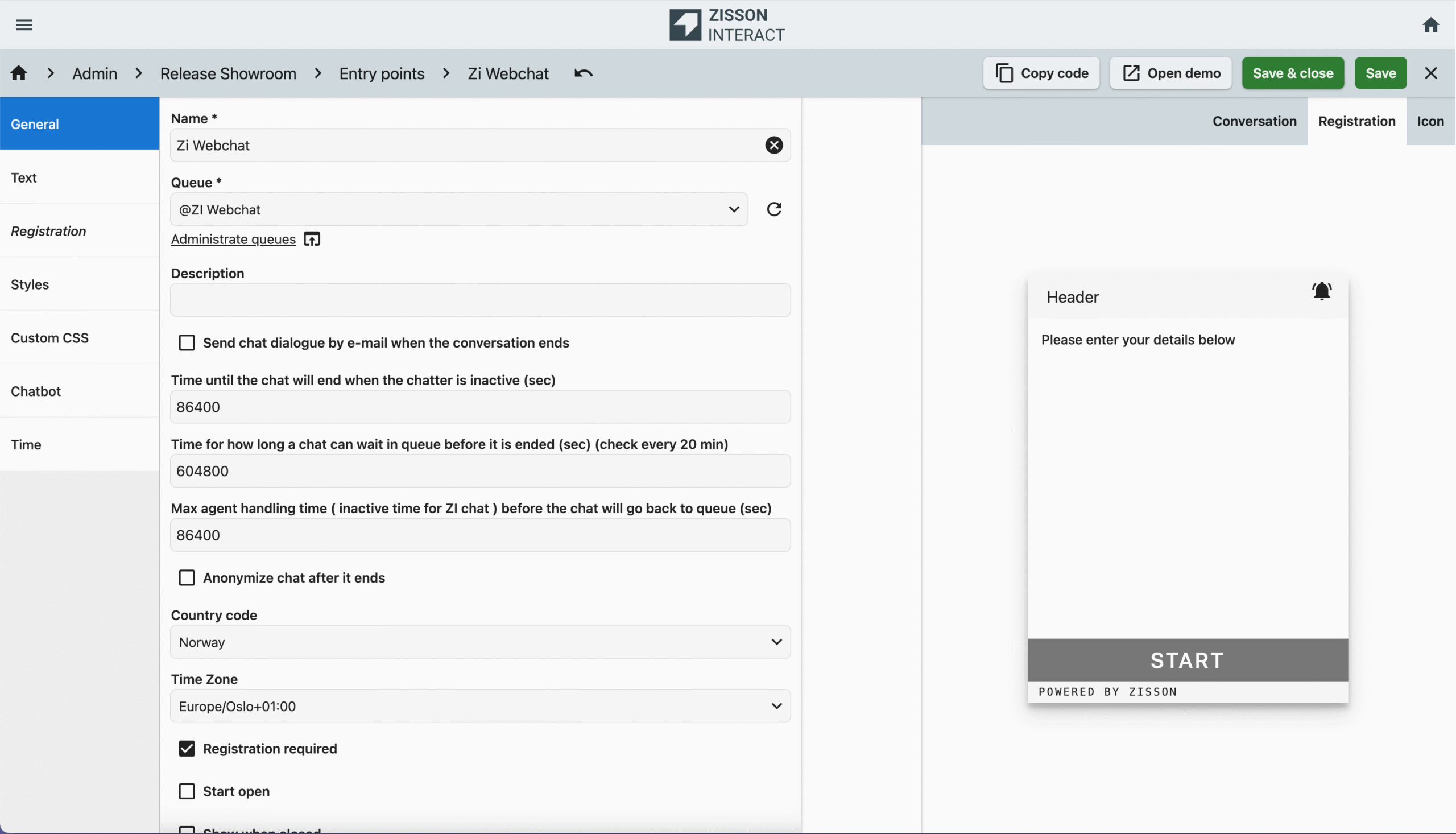
Simplified setup and configuration of the chat widget.
We’ve updated the chat entry point UI to make it easier and faster to build, configure, and maintain chat widgets.
The improved structure reduces setup time and makes common settings easier to find and update.
How it works
Preview, clearer structure, and improved save options.
The entry point UI now includes a live preview of the chat widget, allowing you to see changes as you configure them.
Text and settings have been restructured for better clarity and navigation.
In addition, new Save and Save & Close actions streamline the configuration workflow and reduce unnecessary steps.
How to use
Activated for all customers running ZI chat.
Shape:
Blast Call – Emergency conference service
What is coming
Instant emergency conference calls with predefined response teams.
We’re introducing a new Blast Call service that enables rapid setup of emergency conference calls.
With a single call to a predefined emergency number, teams can instantly assemble key participants into a live conference—supporting fast coordination during incidents, security events, or critical operations.
How it works
Flow-based conference setup with automated participant dialing.
Via an IVR flow services the caller is routed into a flow where a Blast Conference module is activated.
The module is connected to a conference and a predefined Blast Conference number list (emergency response team).
When an incident occurs:
- A team member calls the emergency number and becomes the conference leader.
- The system automatically dials all numbers in the connected list, one by one.
- All confirmed participants—internal or external—are joined into the same live conference.
Conference behavior can be configured, including:
- Whether the conference ends automatically when the leader leaves
Emergency response teams are managed through a standard number list, allowing customers to self-manage participants without flow changes.
How to use
Offered as an add-on service.
Agent improvements:
Updated Agent UI – Modernized Color Scheme
What is coming
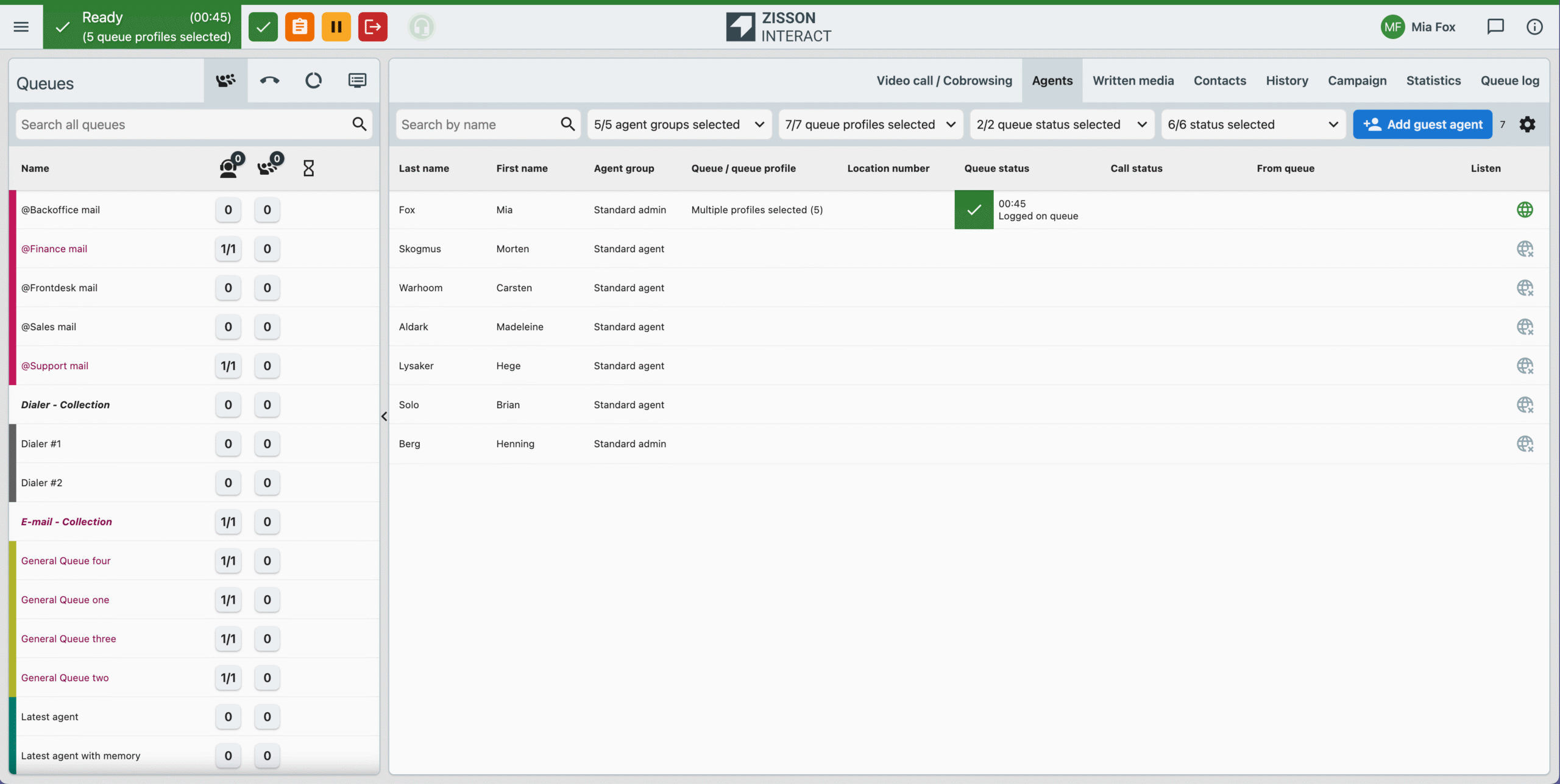
We’ve updated the agent UI with a refreshed color scheme and lighter visual outlines.
The new design improves readability, reduces visual noise, and creates a more modern and consistent experience across the platform.
How it works
Refined colors, contrast, and layout details.
The update introduces lighter backgrounds, clearer contrast, and more subtle outlines throughout the agent interface, including queues, history views, and navigation elements.
No functionality has changed—this update focuses purely on visual clarity and usability, making it easier for agents to scan information and work efficiently during busy sessions.
How to use
Activated for all customers on deploy.
Goup SMS are now linked an SMS conversation flow
What is coming
Improved SMS conversation flow for group messages.
We’ve enhanced the SMS channel to provide clearer presentation and better continuity when working with group SMS.
This makes it easier for agents to understand context, follow message history, and manage customer conversations more efficiently.
How it works
Automatic linking of group SMS to conversation flows.
Sent-out group SMS messages are now linked back to the inbound SMS number and displayed within the same conversation flow.
This creates a unified SMS history, allowing agents to track the full dialogue—from outbound group messages to inbound replies—without losing context.
How to use
Available for all customers using inbound SMS channel and group SMS.
Improved warning and error notifications
What is coming
Clearer visibility and handling of network disturbances.
We’ve improved how network connection issues to the Zisson Interact (ZI) server are detected and communicated to agents.
This helps agents better understand the current session status and reduces uncertainty during temporary network disturbances.
How it works
Enhanced warnings and reconnect feedback.
When a network issue is detected, the agent UI now presents clearer warning messages and status indicators, showing whether the session is experiencing connectivity problems or is in the process of reconnecting.
Visual feedback is updated in real time, helping agents quickly understand what’s happening and what actions—if any—are required.
How to use
Activated for all customers on deploy.
Admin improvements:
Identity Services Admin – central identify provider orchestration
What is coming
Centralized administration of customer identity services.
We’re introducing a new admin module for orchestrating customer identity services, such as BankID.
This provides a single place to manage identity configurations and enables support for multiple identity providers per customer.
How it works
Dedicated identity services module with role-based access.
A new Identity Services admin module allows centralized configuration and management of all supported identity providers.
Customers can now configure multiple identity providers for the same customer instance, for example both Norwegian and Swedish BankID.
Access to the Identity Service admin is controlled through agent feature settings, ensuring only authorized users can manage identity-related configurations.
How to use
Customer identity is offered as ad-on services.
New retentions setting for session fields
What is coming
Separate retention control for saved and non-saved session fields.
We’ve introduced a dedicated retention policy for session fields, giving customers better control over how long conversation-related data is stored.
This supports both short-lived operational needs and longer-term data requirements, while aligning with privacy and compliance expectations.
How it works
- Non-saved session fields are retained for up to 24 hours.
- Saved session fields are retained according to a customer-specific retention time.
Retention settings are configured at the customer level and managed by Zisson during customer creation or updated by Zisson support.
This makes it possible to define longer or shorter retention periods depending on regulatory, operational, or business needs.
How to use
Available for all customers. Default values can be changed via Zisson support.
API and Integrations:
Click2Call via Tel links
What is coming
Seamless click-to-call from external web applications.
We now support tel: hyperlinks, making it easier for agents to initiate calls directly from external systems such as CRMs or web applications.
This enables faster call handling without manual copy-paste of phone numbers.
How it works
Automatic call handling and return to source page.
When an agent clicks a tel: link in a web page, the Zisson application opens in a new tab, automatically generates the call, and then returns focus to the original page where the call was initiated.
This allows agents to stay in their CRM or external application while using click-to-call functionality.
How to use
Activated for all customers on deploy, users need to allow for using Zisson Interact as default telephone provider in the browser.
Tele2 växel – contact forward info
What is coming
Clear visibility of call forwarding status for Tele2 contacts.
We’ve added support for managing and displaying call forwarding information for Tele2 Växel contacts.
This gives agents better insight into contact availability and routing status.
How it works
Call forwarding shown alongside presence information.
Call forwarding details for Tele2 contacts are now displayed in the same layout as presence information.
This provides a unified and intuitive view, making it easy for agents to understand whether a contact is available, forwarded, or redirected—without switching context.
How to use
Activated for all customers using Tele2 contact integration.
LeadDesk AI Bot – Agent Assistant Integration
What is coming
AI-powered assistant for agents inside the Zisson UI.
We’ve extended the LD AI bot integration to support use as an in-UI assistant for agents.
The LD bot can now act as a knowledge source and provide real-time assistance during ongoing chat conversations,
helping agents respond faster and more accurately as well as being a general assistant for agent via the Zisson written media UI.
How it works
Assistant connector via AI Orchestrator.
A new Assistant Connector allows an LeadDesk chatbot—built and managed in the AI Studio—to be configured as an assistant in the Zisson Interact.
In the AI Orchestrator, the bot is set up as both a provider and an assistant.
Once enabled, the assistant can listen to the Zisson chat flow and support agents with contextual guidance, suggested responses, and knowledge-based answers during live conversations.
How to use
Offered as an add-on service together with LeadDesk AI chat bot.
BankID Integration for the Norwegian Market
What is coming
BankID identification for voice channels in Norway.
We’ve added support for Norwegian BankID through a new integration.
This enables secure and user-friendly BankID identification in voice and IVR flows,
including support for modern biometric authentication and new backchannel use cases.
How it works
Identisure integration with backchannel BankID support.
The new integration connects to Identisure and supports the latest BankID backchannel identification architecture.
This allows callers to identify themselves without using a landing page.
In voice or IVR flows:
- The caller provides their SSN.
- Identification is initiated via the BankID app using biometric authentication (when enabled by the user).
- The backchannel flow completes the identification without requiring a web session.
This unlocks new voice-based identification scenarios in Norway, making BankID faster and easier to use in IVR and call flows while maintaining high security standards.
Deploy
Offered as an add-on service.
UX & Smaller improvements:
What is coming
Smoother workflows and clearer information across the UI.
We’ve made several smaller UX improvements to improve clarity, consistency, and usability for both admins and agents.
These changes reduce friction in daily work and make information easier to understand and manage.
In the agent UI
- Improved how session field information is displayed for agents on the call panel and in conversation history, including better scaling for wider texts such as URLs.
- Removed certain system-generated messages from the history log (for example, chat logs used only for third-party storage), resulting in cleaner and more relevant histories.
- Fixed an issue where caller names were occasionally missing in call details for service numbers.
- Improved UX for video and co-browsing by disabling SMS caching, making it possible to create new sessions during an ongoing conversation.
- Fixed an issue for video where a black screen could appear during video conversation initiation or when muting video.
- Resolved cases where the live ready-agent counter was not updating correctly in wallboards, the Queue Live Status API, and Entertainer rules.
For the admins
- Fixed an issue in the Callback API where some scheduled callbacks incorrectly triggered ring-all routing.
- Added a new info box explaining scheduling logic, making it easier to configure and manage time schedules correctly.
- Moved Feature 210 (BankID for agent) to the General section for better discoverability and consistency.
- Applied multiple admin fixes, including:
- Queue access requiring service layout permissions
- Search in Enquiry Log admin
- Chat attachment access permissions
How to use
Activated for all customers on deploy.