
Zisson Release Notes – 2026-04
04/06/2026
Overview
This release delivers major upgrades to agent tools, AI capabilities, administration, and reporting — with a new configurable enquiry log, improved history filtering, enhanced AI voice agents, tighter role-based access control, and improved callback visibility. :contentReference[oaicite:0]{index=0}
Agent Tools:
History Filters
Extended Enquiry Log
Enquiry Log Reporting
AI:
Virtual Voice Agent Service Module
Transcriber Language Control
Automated AI Enquiry Log
Voice Agent – Contact Search Tool
Voice Agent – Transfer & Tooling Improvements
Administration:
Role-Based Access Control (RBAC)
Integrations:
Telavox – Multi-Tenant Sync
UX & Smaller Improvements:
Call Details – Callback Indicator
Stability and Improvements:
Bug fixes and functional improvements
Agent Tools:
History Filters
What’s Coming
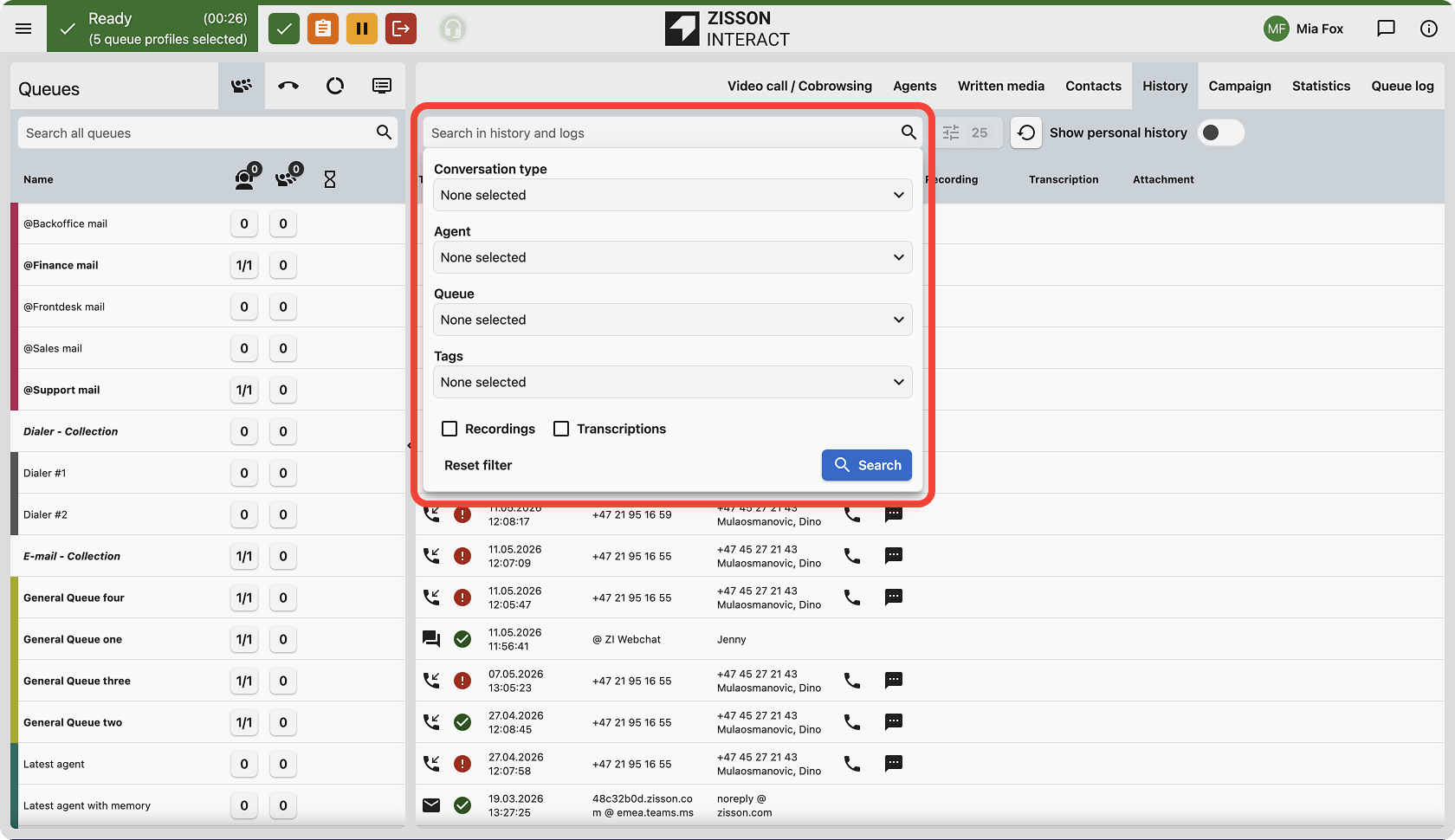
We are improving the History view with more powerful filtering options, allowing agents and supervisors to quickly find the conversations that matter most.
How It Works
- New filter toggles and dropdown menus are available in the History header.
- Selecting “Has Recording” hides all interactions without audio files.
- The “Type” filter makes it possible to isolate inbound, outbound, written media, and telephony interactions.
- Combined with existing filters for agents, queues, and tags, the search results become more precise.
How to Use
Use the new History view. Navigate to History and open the filter menu to apply the new criteria.
Extended Enquiry Log
What’s Coming
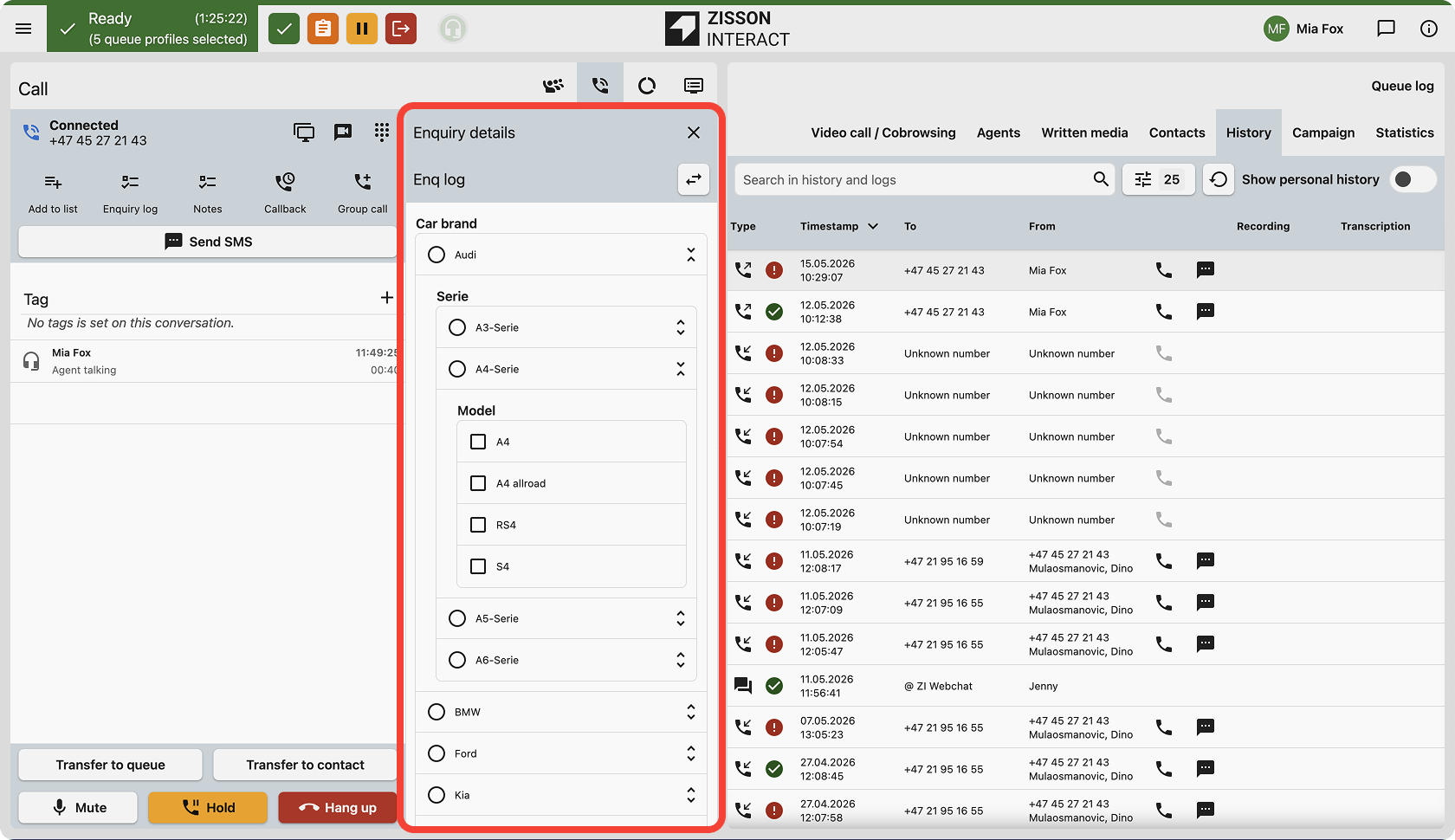
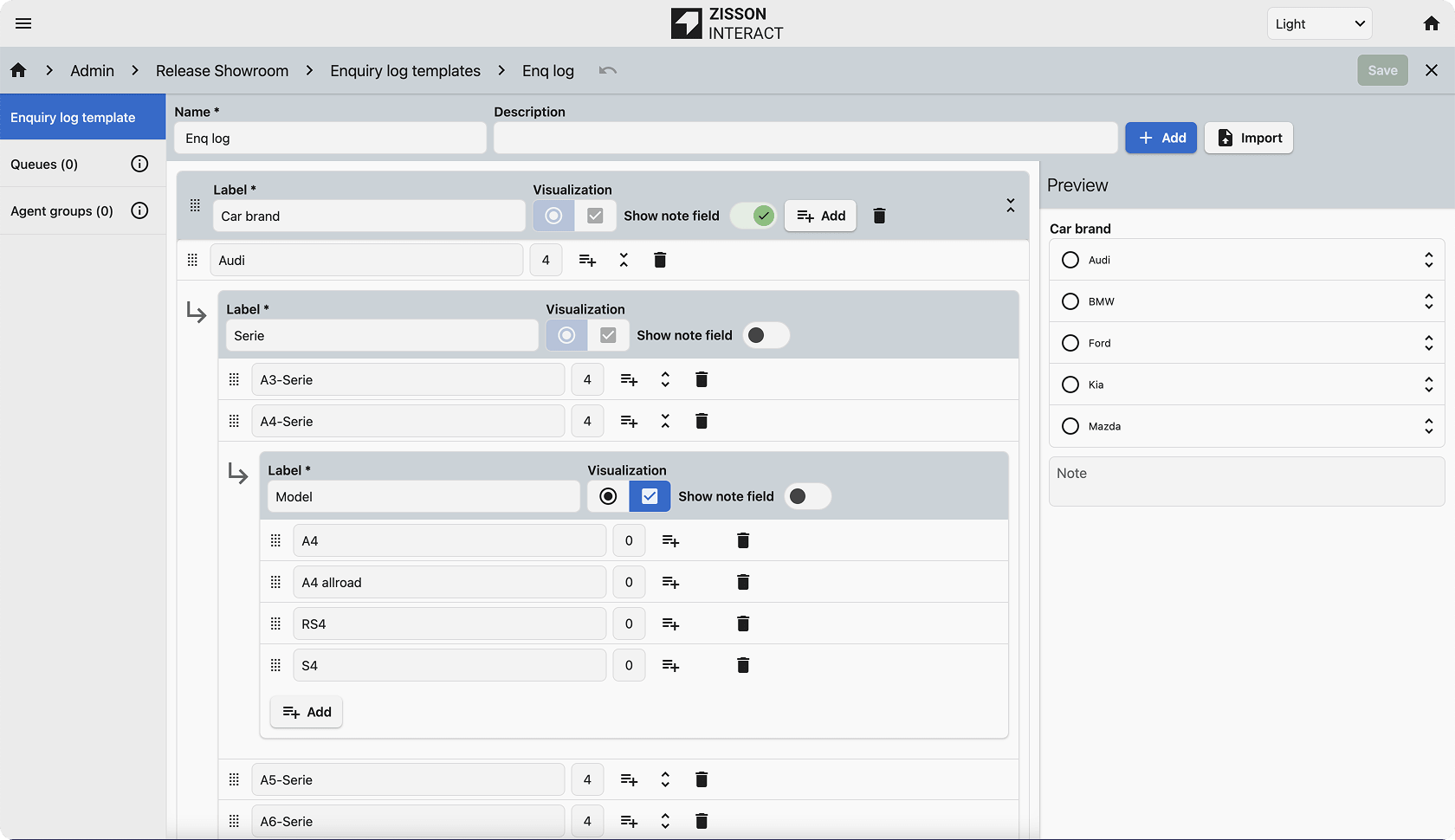
We are launching a powerful and highly configurable enquiry form that enables businesses to capture richer and more structured customer information.
How It Works
- Administrators can build complex forms with multiple components using a new form builder.
- Category trees can be imported from a file.
- Agents can search through the tree structure to quickly find the correct classification.
- The enquiry log can now be configured as mandatory per queue, forcing a wrap-up state until completed.
How to Use
Configure new templates under Admin > Enquiry Log. To make it mandatory, enable the “Mandatory” toggle on the relevant Queue settings.
Enquiry Log Reporting

What’s Coming
We are updating our Enquiry Log reports to support the new, more flexible enquiry format.
How It Works
Enquiry Log (Multi level): Provides a detailed row-per-conversation view, mapping text fields, tree values, and multi-select options.
Enquiry Details (Multi level): Provides a summarized view of enquiry data, aggregating tree values and options to identify contact reasons and trends.
How to Use
Access the updated reports through the standard reporting interface.
AI:
Virtual Voice Agent Service Module
What’s Coming
We are introducing a dedicated Service Module for Virtual Agents, allowing easier setup and seamless routing of AI-driven interactions.
How It Works
The module handles entry and exit logic for AI agents, ensuring that success, failure, and maximum call scenarios are routed correctly.
How to Use
Add the “Virtual Agent” module to your Service Layout in the Admin portal.
Transcriber Language Control
What’s Coming
You can now control how the AI Transcriber selects its language for improved accuracy in multilingual environments.
How It Works
- Follow the voice channel language.
- Use a fixed language preset.
- Automatically detect the language used by the caller or agent.
How to Use
Configure the settings under Admin > AI > Transcription.
Automated AI Enquiry Log
What’s Coming
The enquiry log is being enhanced to support multiple components within a single enquiry.
How It Works
- Each enquiry can contain multiple components.
- Each component can have its own label and content.
- AI Insights has been updated to understand and analyse the new structure.
How to Use
Add multiple fields and components when creating or updating enquiry logs.
Voice Agent – Contact Search Tool
What’s Coming
Voice AI Agents can now search and find contacts directly in Zisson Interact.
How It Works
- Search contacts directly in Zisson Interact.
- Find the correct person faster.
- Support intelligent routing and transfers.
- Reduce manual handling and operator involvement.
- The TransferToContact AI tool can perform contact lookups without customer-specific API keys.
How to Use
Available as an add-on service together with the AI Voice Agent.
Voice Agent – Transfer & Tooling Improvements
What’s Coming
Enhanced control for Voice Agents, including direct queue transfers and improved external integration stability.
How It Works
- Voice Agents can transfer callers directly to designated queues.
- External voice provider integrations such as ElevenLabs have been optimized.
- Improved reliability for external AI tool usage.
How to Use
Available as an add-on service with the AI Voice Agent.
Administration:
Role-Based Access Control (RBAC)
What’s Coming
We are introducing more granular Role-Based Access Control within the Admin interface.
How It Works
- Business Unit Isolation: Users can only view and edit agents and groups belonging to their assigned Business Unit.
- Admin Feature Protection: Sensitive administrative settings require the new “Feature Admin” role (Feature 226).
How to Use
Assign the Feature Admin role to users who require access to advanced administration features.
Integrations:
Telavox – Multi-Tenant Sync
What’s Coming
We now support syncing presence and contacts from multiple Telavox IPX instances into a single Zisson system.
How It Works
The integration supports up to 200 Telavox switches simultaneously while maintaining accurate call state and presence information.
How to Use
Configure multiple Telavox tenants within the Integration UI in Wave Admin.
UX & Smaller Improvements:
Call Details – Callback Indicator
What’s Coming
Call Details now clearly indicate when an inbound call has been converted into a callback request.
How It Works
A new event row called “Converted to Callback” with a dedicated icon is added to the conversation history whenever a callback request is created.
How to Use
Automatically visible in Call Details for relevant conversations.
Bug fixes and functional improvements
What’s Coming
This release also includes multiple bug fixes and functional improvements across the platform.
- Call State: Fixed timers continuing after callers disconnected while on hold.
- SMS Notifications: Fixed an issue where SMS notifications could occasionally be sent to the wrong recipient.
- Chat: Fixed missing email transcripts after chat sessions.
- Admin Permissions: Fixed access issues for users with only Feature 109 enabled.
- Dialer: Improved campaign date/time alignment and reservation time handling.
- History: Fixed incorrect icons shown for unanswered chats.
- Call Transfer: Fixed missing ring duration and agent information after transfers.
- Enquiry Log / Chat Details: Fixed an issue where large enquiry logs could hide session information and fields.
- Wallboard 2.0: Fixed unusually small text introduced in the previous release.